
Digital accessibility is of crucial importance in today’s connected world. It ensures that everyone can use digital products and services easily and without assistance, regardless of their abilities or limitations, such as visual, hearing, cognitive or motor impairments. This applies not only to people with permanent disabilities, but also to those with temporary or situational limitations, such as an arm injury or being in a noisy environment.
Since June 2025, organisations in the EU have been legally obliged to make their digital services accessible. In Germany, this is implemented through the Accessibility Enhancement Act (BFSG), which incorporates the guidelines of the European Accessibility Act (EAA). However, accessibility is more than just a legal obligation; it offers companies genuine added value and significant competitive advantages.
Contents
- Why is accessibility important?
- Legal requirements and standards
- Scenarios for achieving accessibility
- How can Enterprise Architecture Management help with accessibility?
- Strategically steering architectural decisions with EAM – accessibility as a non-functional requirement
- Defining architectural standards is crucial
- Key measures for accessible design in systems
- The role of audits and artificial intelligence (AI)
- Conclusion
Why is accessibility important?
Ensuring the accessibility of digital content is of great importance to businesses for several reasons:
- Expanding the target audience: Around 15 per cent of the world’s population lives with a disability. Added to this is an ageing society that is increasingly reliant on accessible digital services. Accessibility helps to reach this large customer group and tap into new revenue potential.
- Cost savings: Integrating accessibility into development processes at an early stage reduces development and adaptation costs in the long term. Retrospective corrections are considerably more labour-intensive and expensive.
- Improved brand image and social responsibility: Companies that implement accessibility demonstrate social responsibility, contribute to digital inclusion and strengthen their brand image.
- Greater reach and SEO benefits: Accessible design improves user-friendliness for everyone and can boost search engine optimisation (SEO), as clearly structured websites with alternative text and simple navigation are indexed more effectively by search engines.
- Minimisation of legal risks: Compliance with legal regulations helps to avoid lawsuits and penalties. For example, in recent years the US government has repeatedly brought and successfully pursued legal action against companies and public authorities for a lack of web accessibility.
Legal requirements and standards
The Web Content Accessibility Guidelines (WCAG), developed by the World Wide Web Consortium (W3C), are internationally recognised standards for web accessibility. They define specific requirements and are divided into three levels of conformance:
- Level A: Basic accessibility – fundamental requirements for minimum accessibility.
- Level AA: Standard, mandatory for many organisationsfrom 2025 – best practice for good accessibility.
- Level AAA: Excellent accessibility – the highest standards for optimal accessibility.
The WCAG are based on four core principles designed to ensure that web content is usable by people with disabilities:
- Perceivable: Information and user interface components must be perceivable by users, e.g. through text alternatives for non-text content or sufficient contrast.
- Operable: User interface components and navigation must be operable, e.g. via the keyboard and without specific time limits.
- Understandable: Information and the operation of the user interface must be understandable, e.g. through legible text and predictable behaviour.
- Robust: Content must be robust enough to be interpreted by a wide variety of user agents, including assistive technologies.
Adhering to these principles results in accessible applications. What does this mean in practical terms for users? Here are two examples:
- Blind users use screen readers to have the content of web pages or documents read aloud to them. If graphical content such as images or diagrams lacks a text description, these elements are inaccessible.
- Mouse control is often regarded as the standard. However, there are many people who do not use a mouse, either because they cannot see the content or because they lack the motor skills to operate the mouse precisely. In such cases, it is essential that keyboards or specially adapted input devices are also supported.
Scenarios for achieving accessibility
The complexity of implementing accessibility depends heavily on a company’s digital landscape. We distinguish between three scenarios here:
- Small, standalone websites For small and medium-sized enterprises (SMEs) with just a single website as their point of contact with customers, implementation is comparatively straightforward.
- Procedure: An accessibility audit is the first step. This identifies problem areas, which can then be improved step by step. It is important not only to resolve specific issues, but also to raise awareness of accessibility amongst all relevant staff (e.g. , content creators, developers).
- Important note: PDF documents and other files offered for download must also be accessible.
- Multiple, unconnected touchpoints Many organisations have multiple digital touchpoints that are not connected to one another, such as separate websites for different brands, individual landing pages and microsites, mobile apps or desktop applications.
- Approach: In principle, the approach from Scenario 1 could be applied to each individual channel. However, this would fail to capitalise on synergies . It is advisable to take the opportunity to introduce company-wide standards and guidelines for accessibility that apply to all touchpoints.
- Challenge: Automated tests can uncover some accessibility issues, but they reliably detect only around a third of them. Human expertise and manual audits are essential for identifying more complex or context-specific barriers. Involving users with disabilities in the audit process is of great value in this regard.
- Complex, interconnected systems If your customers’ journey takes them through various interconnected systems (e.g. PIM, DMS, CRM, ERP, email systems), all components must work together seamlessly and be accessible. It is counterproductive if the company website is accessible but the subsequent landing page from the CRM system is not.
- Approach: In the case of complex system landscapes, it does not make sense to consider each system in isolation. Instead, business-critical customer journeys should be prioritised and improved across all relevant systems in a vertical cross-section. This requires a comprehensive strategy and coordination.
- Organisational embedding: The entire organisation must build up a basic understanding of accessibility and optimise internal processes accordingly. This can also be a good opportunity to improve agile processes and strengthen cross-team collaboration. Developing a culture of accessibility, in which accessibility checks are integrated into standard workflows, is crucial in this regard.
How can Enterprise Architecture Management help with accessibility?
Enterprise Architecture Management (EAM) is an extremely valuable strategic tool for complex and heterogeneous system landscapes. It helps to understand and manage an organisation’s IT landscape holistically and to align it with business processes.
The integration of EAM as a strategic link between accessibility requirements and the necessary IT implementation arising from the identified measures is certainly both sensible and necessary.
By gaining an overview of the IT landscape through managed enterprise architecture, we have created the means to identify, transparently and flexibly, the areas that may play a role in accessibility. With knowledge of the structure of the application landscape and its information flows, the key parameters for business-critical ‘customer journeys’ can be identified and analysed in detail. This makes it easier to recognise interrelationships and display them across the entire process and application landscape, thereby enabling synergy effects in solution development and optimisation.
Almost all common EAM tools offer solutions in this area using
- heatmaps
- dependency diagrams
- Change impact analyses
which provide an initial overview of the relevant systems or applications.
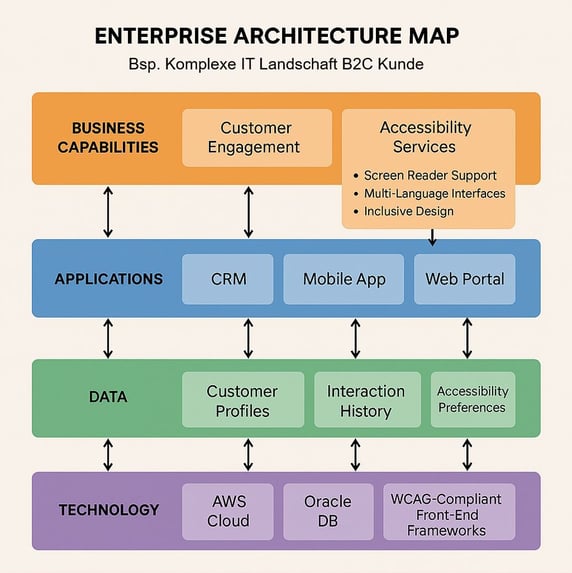
Fig.: Example of a dependency analysis
By drilling down into the individual architectural layers, it is possible to strategically coordinate and implement the necessary measures.
EAM creates transparency
Due to legal requirements and social necessity, accessibility is no longer just a ‘nice-to-have’. A structured EAM approach creates transparency for targeted management and sustainable implementation:
- Identification of all relevant systems involving user interaction and public access
- Assessment and status modelling of WCAG and BITV requirements
- Linking the relevant business processes and data flows to identify dependencies across the entire architecture
Governance through EAM
Accessibility is not just a technical challenge – it is a strategic task that requires clear responsibilities, standards and control mechanisms. An Enterprise Architecture Management approach provides precisely the governance structures needed to systematically implement and monitor accessibility across the IT landscape:
- Clear allocation of responsibilities across the various stages: project, operations and quality assurance
- Establishment of standards and guidelines
- Definition of control mechanisms with metrics and KPIs
- Integration into project and portfolio governance (e.g. projects relevant to accessibility are flagged and prioritised where appropriate)
- Monitoring and continuous improvement through lifecycle management and lessons learnt during architecture reviews
Roadmap and transformation planning
EAM methods such as capability maps and transformation roadmaps can be used to plan and prioritise the implementation of accessibility:
- What other ‘capabilities’ are required for accessibility support? Which reference models can be used?
- Which projects contribute to accessibility?
- What does the migration path look like – in the short, medium and long term?
- Communication and stakeholder engagement as a strategic means of embedding digital responsibility within the organisation
Establishing standards
EAM enables the definition and enforcement of architectural principles as IT landscape requirements:
- “Accessibility is a non-negotiable quality criterion”
- All digital touchpoints must be accessible
- “Accessibility” is taken into account at every stage of the project – from requirements specification to final acceptance
- Company-wide definition of accessibility standards (e.g. WCAG, BITV)
- Documentation of architectural principles and design guidelines as implementation guidelines
An EAM approach not only provides transparency but also the governance structures needed to implement accessibility in a strategic, sustainable and legally compliant manner. For management, this means that accessibility becomes a manageable task – with clear responsibilities, measurable targets and controllable processes.
Strategically steering architectural decisions with EAM – accessibility as a non-functional requirement
In modern IT landscapes, accessibility is far more than a legal obligation – it is a quality feature that ensures user-friendliness, inclusion and future-proofing. This raises a number of questions:
How can accessibility requirements be defined?
How should they be specified?
Which guidelines and metrics are conceptually relevant?
One approach is to view accessibility as non-functional requirements (NFAs) and to systematically integrate them into architectural decisions, thereby managing them strategically.
Non-functional requirements define how a system works – not what it does. Accessibility therefore falls into the same category as requirements such as:
- Usability
- Security
- Performance
- Maintainability
It influences architectural decisions at all levels – from UI design and technology stacks right through to integration and implementation patterns.
An EAM approach provides the methodological foundation for embedding NFAs such as accessibility into architectural work:
- Architectural principles: e.g. ‘Accessibility is an integral part of every solution.’
- Reference architectures: These include accessibility requirements for front-end, back-end and interfaces.
- Evaluation models: Enable the assessment of architectural options in terms of accessibility.
This naturally has specific implications for all architectural decisions relating to accessibility requirements:
- Technology selection: Frameworks with good accessibility support (e.g. WCAG-compliant components, correct use of ARIA attributes).
- Design decisions: e.g. colour contrast, keyboard navigation, screen reader compatibility.
- Integration strategies: e.g. accessible interfaces for external systems and services.
The EAM approach helps to document these decisions in a transparent manner and to manage them across the board.
Defining architectural standards is crucial
Treating accessibility as a non-functional requirement means integrating it into the very fabric of the IT architecture. An EAM approach provides the necessary transparency, control and governance to implement this requirement strategically – not as an add-on, but as an integral part of digital excellence.
As described in the EAM guidelines, the definition of architectural standards – and, in particular, the requirements for accessible design guidelines – is crucial.
Key measures for accessible design in systems
Regardless of the scenario, organisations should apply the following universal principles of accessible design and, where appropriate, incorporate them into their architectural standards.
- High-contrast design: Colours and fonts must provide sufficient contrast to ensure readability.
- Alternative text for images and videos: Visual content requires descriptive alternative text so that it can be recognised by screen readers.
- Keyboard navigation: All content must be fully accessible without the use of a mouse.
- Structured content and plain language: Logical heading hierarchies, clear language and easy-to-understand forms help to improve comprehensibility. Avoid technical jargon and use simple, direct wording.
- Accessible documents: Digital documents such as PDFs and presentations must be designed to be accessible.
- Subtitles and transcripts for media: Videos should have subtitles or audio descriptions, and audio material should include transcripts.
- Avoid relying solely on colour to convey information: Important information should not be conveyed solely through colour, but also through other visual or textual cues.
- Skip links for recurring elements: Enable users to skip repetitive navigation elements, e.g. via a ‘Skip to main content’ link.
The role of audits and artificial intelligence (AI)
Audits are an essential step in checking accessibility and identifying shortcomings.
- Start with automated tests to quickly identify missing alternative text, incorrect use of headings and colour contrast violations. Tools such as the ARC Toolkit or the Colour Contrast Analyser are useful for this.
- Building on this ,carry outdetailed manual audits, as automated tools may overlook more complex or context-dependent barriers. Collaborating with accessibility experts orconsultants can be very helpful in this regard.
- Document all issues found in a comprehensive report with clear descriptions and recommendations for rectification.
- Once accessibility issues have been rectified ,it is essentialto retest the content to verify the effectiveness of the corrections.
- Regular audits and continuous monitoring are crucial, as digital content is constantly evolving.
Artificial intelligence (AI) offers promising opportunities to revolutionise digital accessibility.
- Context-adaptive interfaces: AI can adapt user interfaces in real time based on user behaviour, device capabilities and the environment, for example by adjusting contrast levels or navigation structures.
- Predictive functions: AI can anticipate users’ needs before they are explicitly stated, for example by adjusting the speaking speed of voice assistants when signs of fatigue are detected.
- Multimodal orchestration: Advanced systems can switch seamlessly between different modes of interaction, such as speech, touch and gestures, whilst maintaining context.
- Dynamic content optimisation: AI can simplify content in real time without losing the original meaning, or dynamically adapt information architectures. Tools such as SUMM AI can automatically translate complex texts into plain language.
- Empathetic error prevention: AI can recognise signs of frustration in users and proactively offer assistance or alternative solutions before errors occur.
Despite its potential, there are also challenges associated with the use of AI in accessibility, such as privacy protection, avoiding bias in AI models and the complexity of the systems.
Conclusion
The sustainable integration of accessibility into existing IT landscapes is a complex but necessary task. It is crucial to take a targeted approach and foster synergies within the organisation. Accessibility is not a one-off measure, but an ongoing process that requires regular monitoring, continuous training of teams and the integration of accessibility checks into daily workflows. By collaborating with specialist accessibility experts and utilising innovative technologies, including AI, organisations can overcome these challenges and create a digital environment that is accessible and usable for everyone. This not only ensures compliance with legal requirements but also leads to a better user experience, expanded market opportunities and a strengthened, inclusive brand image.
Authors
| Karsten Lenz is a Lead UX Designer and Front-end Developer at iteratec in Hamburg. He has been involved in digital product development since 2010 and bridges the gap between design and development. In doing so, he has developed user-centred products for a wide variety of clients in the B2C and B2B sectors and across industries such as banking, e-commerce, logistics and public transport. For several years now, he has been focusing in particular on digital accessibility. | 
|
|
Thomas Heidinger has over 25 years’ management and IT experience gained from numerous national and international projects. His main areas of expertise lie in strategy and management consultancy in the field of digital transformation. He has gained extensive leadership experience in the development and implementation of digitalisation strategies, with a particular focus on strategic decision-making and the design and implementation of digital business models, concepts and platforms. He also brings further expertise in the development and design of end-to-end mobile architectures, as well as in architecture management for complex IT landscapes and procurement processes. |

|
Do you have any questions or need assistance?
You can find out more about user experience for businesses on our website. Feel free to get in touch via the contact form!